
Wednesday, 20 April 2016
Feed back sheets

Wednesday, 23 March 2016
Evaluation
For this project we mainly tested our editing skills as well as our audio since on this project we had to do it with a green screen . A green screen is like a seamless background in photography however instead of it being white or black it is green. However unlike photography you don't you it to take images with a flawless background, you take shots of different scenes and artificially replace the green with something else for example yo can take the green out and replace it with a red carpet event. Usually large productions will use a massive green screen that will lay across the floor and into a suspended position.
We were asked to make a thirty second long short film and it needs to have around 3 audio tracks, no dialogue and requires at least one static or dynamic background.
The first step of making the short film with a working green screen is choosing on what you will replace the green screen with since there is no dialogue we didn't need to work on a script or doing a location evaluation sheet since we were only going to the TV studio.We recorded with a 16 GB, class 10 SD card this allowed us to capture more footage with a high quality so we would have a large selections of clips to chose from when we started editing . Secondly you'll need to do any action and have it recorded on any kind of video camera. Then when you are done we had to move onto the editing software since its the only way that the project would carry on. The programming software we used was Adobe Premier Pro this allows for tighter control of the shots once they have been imported. This can been seen in different professional made movies since some times even they can't recreate what is needed by physical props and or the actual location. I will show a example picture below and I will also link them.
 Link - Batman (Before)
Link - Batman (After)

So after I've imported all of the shots from the SD card onto the editing program. With this I was able to create a skeleton edit and thanks to this I created a linear story without any post editing, then I down loaded a few effects from YouTube as well as a background which I wanted to use. Then all I had to do was place the audio and the the background accordingly. I had to also do a voice over so I went to the studio booth and recorded so tracks these will be my narration on what is basically happening through this linear story. After all of this I export the media file as a AVID and uploaded it to YouTube where I can get constructive criticism for my work. However I did have some problems with the editing software, firstly it was extremely slow on the start up procedure as well as loading the media files I needed, that also included all of the items I've downloaded. Luckily for me that I was able to produce a suitable piece of work with the editing software.
If I had to do any thing differently, i would use more effects since it would push my editorial skills since there will be more variables to deal with and also to line up with the time line. Another thing i would change would be the Actors range of movements and emotions because as it is now the actor looks lost on what his purpose is.
We were asked to make a thirty second long short film and it needs to have around 3 audio tracks, no dialogue and requires at least one static or dynamic background.
The first step of making the short film with a working green screen is choosing on what you will replace the green screen with since there is no dialogue we didn't need to work on a script or doing a location evaluation sheet since we were only going to the TV studio.We recorded with a 16 GB, class 10 SD card this allowed us to capture more footage with a high quality so we would have a large selections of clips to chose from when we started editing . Secondly you'll need to do any action and have it recorded on any kind of video camera. Then when you are done we had to move onto the editing software since its the only way that the project would carry on. The programming software we used was Adobe Premier Pro this allows for tighter control of the shots once they have been imported. This can been seen in different professional made movies since some times even they can't recreate what is needed by physical props and or the actual location. I will show a example picture below and I will also link them.
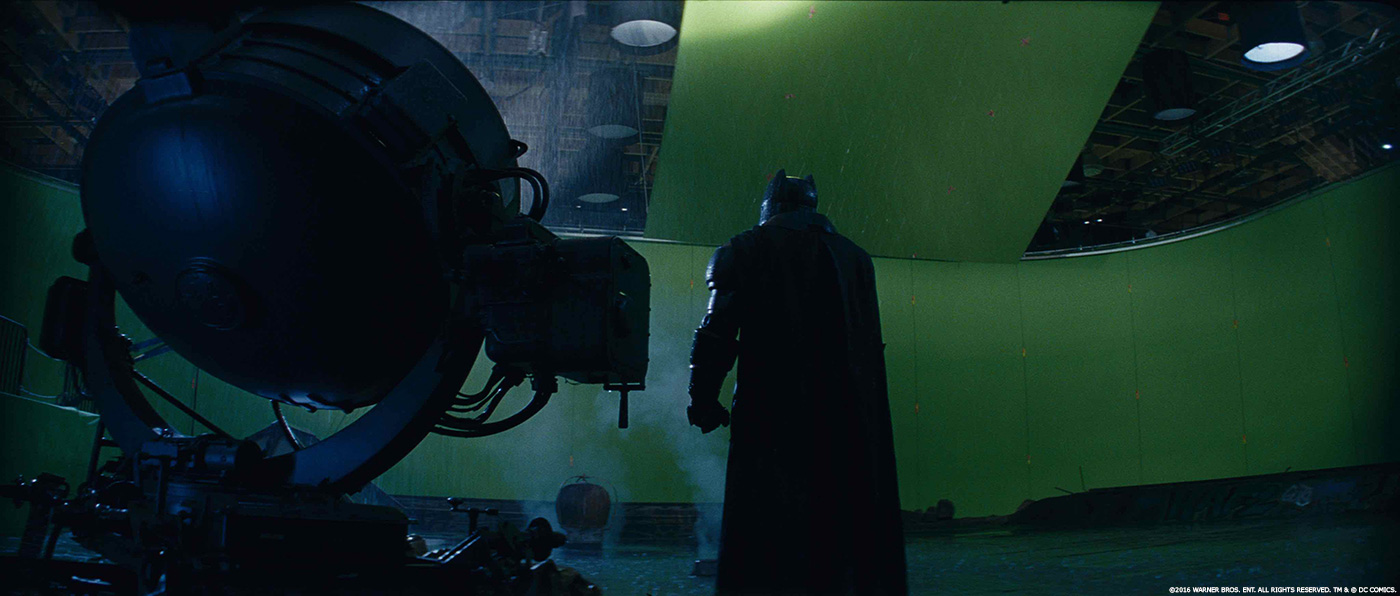 Link - Batman (Before)
Link - Batman (After)
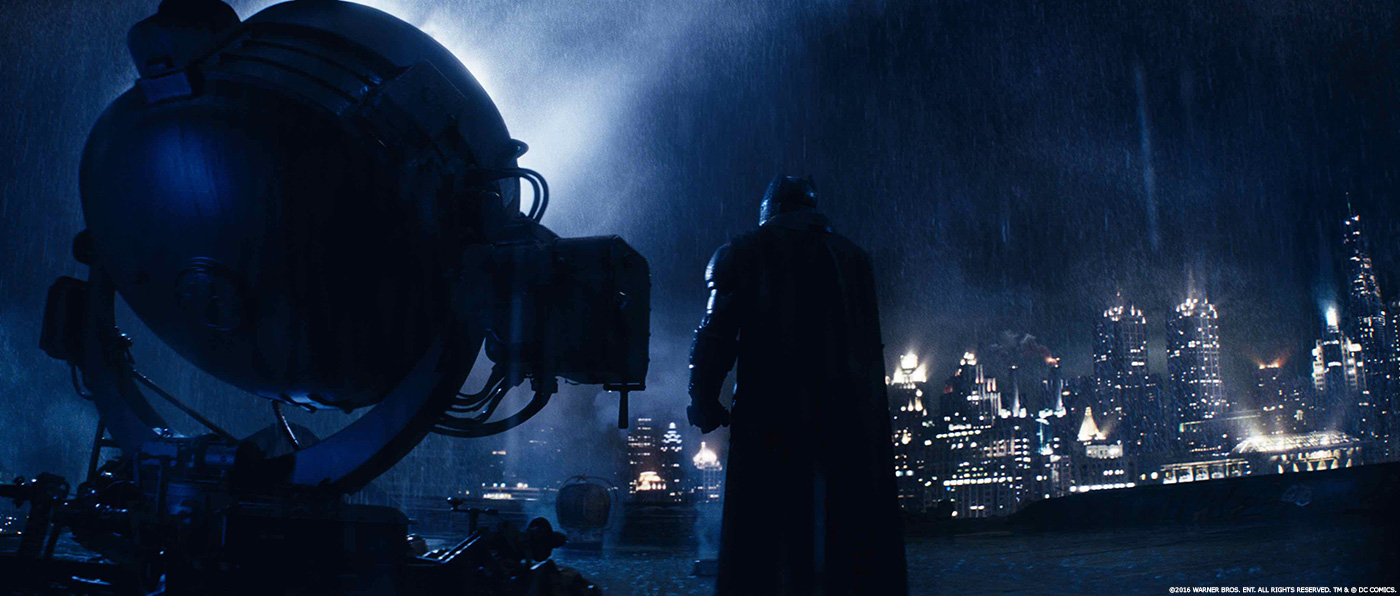
So after I've imported all of the shots from the SD card onto the editing program. With this I was able to create a skeleton edit and thanks to this I created a linear story without any post editing, then I down loaded a few effects from YouTube as well as a background which I wanted to use. Then all I had to do was place the audio and the the background accordingly. I had to also do a voice over so I went to the studio booth and recorded so tracks these will be my narration on what is basically happening through this linear story. After all of this I export the media file as a AVID and uploaded it to YouTube where I can get constructive criticism for my work. However I did have some problems with the editing software, firstly it was extremely slow on the start up procedure as well as loading the media files I needed, that also included all of the items I've downloaded. Luckily for me that I was able to produce a suitable piece of work with the editing software.
If I had to do any thing differently, i would use more effects since it would push my editorial skills since there will be more variables to deal with and also to line up with the time line. Another thing i would change would be the Actors range of movements and emotions because as it is now the actor looks lost on what his purpose is.
Wednesday, 2 March 2016
Editing


I did this for basically every piece of audio and I also had to line up with the video. Then at the end of all that I just needed to upload it onto YouTube.


Friday, 26 February 2016
Proposal
I will do this by making use of the green screen that will be available, this will be placed in the TV studio and since it's there will be suitable equipment and lighting already set up I would only take a few minutes to take the shots needed. However the rest of the time limit would be working on the editing side since this entire project is testing our editing

As you can see the image above is my story board, this is a short I know but this is only to allow me to test and push my editing skills, but this is my story.
Green Screen (Spider Diagram)
- https://www.youtube.com/watch?v=gt066VSIS44&feature=youtu.be
- Iron man
- Hunger Games
- Star Wars
- Harry Potter
- Divergent
- Avatar
- Prometheus
- Props
- Phone
- Sunglasses
- Clothing
Wednesday, 27 January 2016
Diegetic/Non-Diegetic
Link-http://filmsound.org/terminology/diegetic.htm
The link above is where i got this information.
Diegetic is a sound coming for a real object such as a radio or a car engine Diegetic sound is any sound presented as originated from source within the film's world
Diegetic sound can be either on screen or off screen depending on whatever its source is within the frame or outside the frame. While non-diegetic sounds come from off screen such as;
The link above is where i got this information.
Diegetic is a sound coming for a real object such as a radio or a car engine Diegetic sound is any sound presented as originated from source within the film's world
Diegetic sound can be either on screen or off screen depending on whatever its source is within the frame or outside the frame. While non-diegetic sounds come from off screen such as;
- narrator's commentary
- sound effects which is added for the dramatic effect
- mood music
The distinction between diegetic or non-diegetic sound depends on our understanding of the conventions of film viewing and listening. We know of that certain sounds are represented as coming from the story world, while others are represented as coming from outside the space of the story events. A play with diegetic and non-diegetic conventions can be used to create ambiguity (horror), or to surprise the audience (comedy).
Wednesday, 20 January 2016
Green Screen
What is a green screen?
Green Screens are a piece of technology that allows the actors to be in a different location. They do this by making a single colour sheet suspended then this allows all of the sheet that isn't blocked by the actors to be changed to another image such as;Fields, Mountains or a different environment completely.
How does it work?
Companies can only use some software because it won't work with any program.
Name 3 Films that use this effect?
Harry Potter
Avatar
Lord of the Rings
Think of a 1 minute scene that you could make using the green screen?
The Demolish of important land marks and the construction of new ones
 This image is from Final Destination 4 as you can see they used a green screen to show a destroyed bridge in the finished product.This can also applies to the movie 300 even though that the back drop is blue

Green Screens are a piece of technology that allows the actors to be in a different location. They do this by making a single colour sheet suspended then this allows all of the sheet that isn't blocked by the actors to be changed to another image such as;Fields, Mountains or a different environment completely.
How does it work?
Companies can only use some software because it won't work with any program.
Name 3 Films that use this effect?
Harry Potter
Avatar
Lord of the Rings
Think of a 1 minute scene that you could make using the green screen?
The Demolish of important land marks and the construction of new ones
This image is from Final Destination 4 as you can see they used a green screen to show a destroyed bridge in the finished product.This can also applies to the movie 300 even though that the back drop is blue
Subscribe to:
Posts (Atom)